Developer Setup
The source code for all the tools under the Visual Analytics banner can be found on github at https://github.com/orgs/Visual-Analytics-Toolbox/repositories
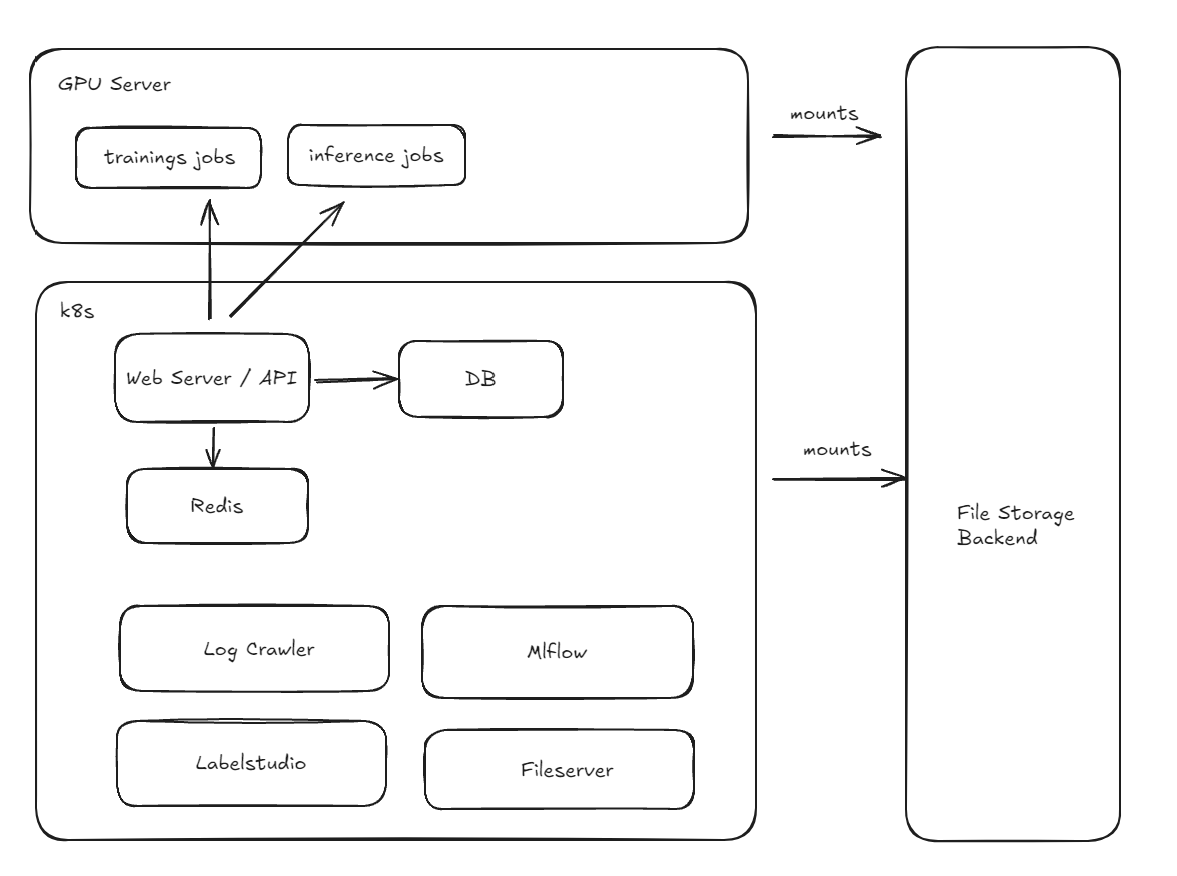
Setup webserver + Database
The core part is the django webserver and the postgres database. Those can be set up locally without k8s. Alternatively you can set up everything with k8s.
Setup Postgres locally
docker run --name local-postgres17 --restart always \
-e POSTGRES_PASSWORD=$VAT_POSTGRES_PASS \
-e POSTGRES_USER=$VAT_POSTGRES_USER \
-e POSTGRES_DB=$VAT_POSTGRES_DB \
-e POSTGRES_HOST_AUTH_METHOD=trust \
-p 4000:5432 \
-v pgdata:/var/lib/postgresql/data \
-d postgres:17
To cleanup you can remove the container and volume and start new.
Setup Dependency for Django Webserver
Restore Backup locally
TODO
Old
To run everything locally you need to set the environment variables:
List of environment variables that are needed for all systems
# postgres connection parameters
VAT_POSTGRES_DB
VAT_POSTGRES_USER
VAT_POSTGRES_PASS
VAT_POSTGRES_HOST
VAT_POSTGRES_PORT

# API parameter
VAT_API_URL
VAT_API_TOKEN

# LogCrawler parameter
VAT_LOG_ROOT

# Labelstudio parameter
VAT_LABELSTUDIO_API_URL
VAT_LABELSTUDIO_TOKEN

# MlFlow
Dev Guidelines
- always use django-debug-toolbar when changing something in the admin dashboards to check that there are no excessive queries being done